Skip to content
View in the app

A better way to browse. Learn more.

Ultimate Subaru Message Board

A full-screen app on your home screen with push notifications, badges and more.

To install this app on iOS and iPadOS
  1. Tap the Share icon in Safari
  2. Scroll the menu and tap Add to Home Screen.
  3. Tap Add in the top-right corner.
To install this app on Android
  1. Tap the 3-dot menu (⋮) in the top-right corner of the browser.
  2. Tap Add to Home screen or Install app.
  3. Confirm by tapping Install.

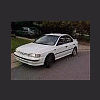
impreza pickup?

Featured Replies

At first i was a bit skeptical, but that is a nice lookin car.

I don't know if I'm supposed to feel guilty for liking that so much but I think it's fantastic!

That's tough; I wonder if they'd allow it in Truck/Suv class at the RallyX?

just throw a lift and some tires on there!!!!! OOOOHHHHHH!!!!!!

Looks a lot like the Chevy badged (prolly Suzukis) we saw in Mexico this fall. Looks good, too bad theyre gonna rice it.

Please sign in to comment

You will be able to leave a comment after signing in

Sign In Now

Account

Navigation

Search

Search

Configure browser push notifications

Chrome (Android)
  1. Tap the lock icon next to the address bar.
  2. Tap Permissions → Notifications.
  3. Adjust your preference.
Chrome (Desktop)
  1. Click the padlock icon in the address bar.
  2. Select Site settings.
  3. Find Notifications and adjust your preference.