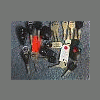
April 6, 200718 yr post a picture of your subaru keys i put this thread under the forum thread by accident i haave so many subaru keys because i collect them mine are my avatar
April 6, 200718 yr this really makes me think some of us are key collectors and some are sensors collectors :lol:
April 6, 200718 yr this really makes me think some of us are key collectors and some are sensors collectors :lol: I like to collect hundred dollar bills.
April 6, 200718 yr I used to have a really cool key with a light in it. Then it broke and now I have a plain oval one.
April 6, 200718 yr I had one of those lighted keys, from my XT. They are coolness! If I never see another GM PassKey again, it'll be too soon!
April 17, 200718 yr I used to have a really cool key with a light in it. Then it broke and now I have a plain oval one. I Own one... You can See it Here: http://www.ultimatesubaru.org/forum/showthread.php?t=73527 is just the Same Thread, in Another Forum... with More Images... I like to collect hundred dollar bills. if I Could, Yes I Would... For More Collections, see this Thread: http://www.ultimatesubaru.org/forum/showthread.php?t=73736

Please sign in to comment
You will be able to leave a comment after signing in
Sign In Now