May 11, 200916 yr End of August Somewhere in Washington. Let's be nice and plan the time off. :-) Edited May 12, 200916 yr by BlueSoob
May 12, 200916 yr Yeah is it me or is it getting late this year? I need to request time off and the such if I'm going to make it.
May 12, 200916 yr Someone's looking to get banned from the Meet and Greet. . . Edited May 12, 200916 yr by Zap
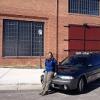
May 12, 200916 yr Author Amanda that you? Yes Scott... it is me. My Outback Sport turned black and got bigger.
May 12, 200916 yr Yes Scott... it is me. My Outback Sport turned black and got bigger. I'm not even going to touch that one Hi Amanda More pics!
May 12, 200916 yr I'm not even going to touch that one Hi Amanda More pics! :lol: regarding the outback remark I have not requested the time off, but should have no trouble doing so, I just need to convince my wife to let us come back from CA and AZ soon enough for me to make it to the show (as it is I already have to miss the evans creek campout :-\)
May 13, 200916 yr :lol: regarding the outback remark I have not requested the time off, but should have no trouble doing so, I just need to convince my wife to let us come back from CA and AZ soon enough for me to make it to the show (as it is I already have to miss the evans creek campout :-\) I would think that WCSS is the main reason for an excuse to leave AZ or California. (Gotta chack out Amanda's new ride:).)
May 13, 200916 yr Author Check out my new ride? Come on kids... this is a family friendly message board... *blushing at my afforementioned comment* :lol:

Please sign in to comment
You will be able to leave a comment after signing in
Sign In Now