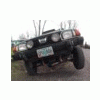
February 20, 200422 yr Ok all check the "new lift album" http://usmb.net/gallery/albup14 !! Im tired and going to bed ill check the feed-back tomarrow :cool: Have a good night to all in the wonderful SUBARU land -Sean
February 20, 200422 yr sweet!!! now you need a weber and kumho's!! i know you have the tires on order!! and a lincoln locker is in need!! then come up to washington and play with us when i'm home!! or at least this time i hope i can stop and meet you before i deploy! sorry for all the !! drunk and happy for ya!! It's looking awesome!! have some fun!! these cars go everywhere you need them too and then some!
February 20, 200422 yr Lookin Good! The ladder is my favorite:D I want to make one now. Glenn, 82 Hatch, well it used to be.... 01 Forester, bent but not broken!
February 20, 200422 yr Author Other than loving the roo to death the latter and the new stencil ore my favorite as well hopefully the new tires will sow up some time this year!! if not then oh well these tires have already proven tough in the mud and snow -Sean
February 20, 200422 yr Author Hey added 2 more pics of roo the rear coilover and a cool side view :cool: -Sean
February 20, 200422 yr Between the humongoid rack (awesome), lift, and those tires - you're going to have to start listing the hight of your car in "elevation" And the stencil is very cool too - script is very fitting especially to lifted EA-81 roo's - something about them strikes me as the militant crudeness/efficiency equation. But I know I'm just wierd:-p - Erik Hosa - Tacoma, WA -
February 23, 200422 yr Author Yeah the stencil was just an idea and it work out to be a for sure thing:D

Please sign in to comment
You will be able to leave a comment after signing in
Sign In Now