July 26, 200817 yr Finally! Some REAL mud tires! 27 inch ATV tires on 14 inch Peugeott steelies Pretty much brand new, only used one time in the mud, they still have the rubber studs on the tread blocks!
July 27, 200817 yr Author I cant wait to get these on the Beast and get in the mud, Im anxious to see what they can do
July 27, 200817 yr I cant wait to get these on the Beast and get in the mud, I'm anxious to see what they can do Proly not much they CAN'T do. (Except go down the highway in a straight line, but that's not why you got them.) We'll need pics of you slingin' some big chunks of mud with 'em.
July 27, 200817 yr ...We'll need pics of you slingin' some big chunks of mud with 'em. Yes, I Was about to Suggest that... Pics Please! ... That would be Nice!
July 27, 200817 yr sweet tires! are you worried about being overweight for these tires? or are they crazy super heavy duty atv tires?
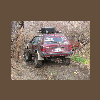
August 3, 200817 yr Author Sorry for the wait yall, just got the tires on today, havent gotten to play in the mud yet, still have to do front wheel bearings and make a snorkel, but here are the beauties on the Beast
August 3, 200817 yr Author I think these will be PERFECT on my Brat, when ever i finish it, they will stick out wider on it. And the Brat has less lift, so it will fill the wheel wells better. I cant wait to get these in the mud! I can climb my haystack with these!

Please sign in to comment
You will be able to leave a comment after signing in
Sign In Now