
Leaderboard
-
brus brother
Members1Points2889Posts -
el_freddo
Members1Points4486Posts -
dp213
Members1Points479Posts -
nvu
Members1Points383Posts




Popular Content
Showing content with the highest reputation on 12/20/19 in all areas
-
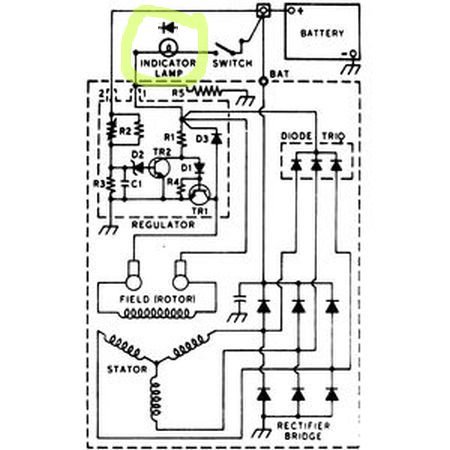
1 pointI think the two problems with using an LED in this circuit are: 1 the LED forward current is only 50-60ma and the bulb is around 1amp used to excite the regulator to start charging until the Diode Trio takes over when charging. So I don't think the voltage would be high enough to start the regulator. 2 when charging there is a little over a volt difference (I measured 1.2v) between the battery and the light terminal so the LED may light even if the alternator is charging.
 1 point
 -
I once had an issue where someone in the rear seat stuck their foot under the driver's seat and dislodged the connector. Not sure why it would be so susceptible. Try re-seating the connectors? Odd that there are no codes? Who read the codes? There are special code ABS/SRS readers for airbag info, different than then standard OBDII readers.1 point
-
1 pointYou could, though depending on the led and resistor picked, it may not light up at all if there's a fault or light up all the time when there's no fault. It might not detect the case of the alternator sending overvoltage as the led doesn't light up in reverse current situations.1 point
-
1 pointSwitched plugs and wires, still the same. Put in new coil pack and all good.1 point
-
1 pointFurther to Dave’s question - did you ever have a full dipstick to begin with? Cheers Bennie1 point
