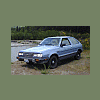
July 11, 200718 yr I just bought a 83 GL D/R hatch and I want to find out more about lifting. Can you guys post some pics to show off some of your lifted hatches? Also, if anyone is in the Seattle area and wouldn't mind showing me your ride sometime let me know. Thanks!
July 11, 200718 yr Just click the "photos" link on the right hand side of this post. Oh, and welcome aboard. Tim
July 12, 200718 yr Author I'e had a few. Although I don't have a lifted hatch right now, I do have a lifted Brat. The Blue 85. http://community.webshots.com/album/37919799NGXlOA What are the lift and rims/tires on that badass 82 hatch?
July 13, 200718 yr Hi This is Jerry, well they use to be hatch backs but now they are hatchbrats. Click on my photos to the right and you will see a light yellow hatchbrat with a 4 inch lift i made myself. Then the blue hatchbrat has a suzuki samurai frame under it:grin: Thanks Jerry
July 13, 200718 yr I'd be happy to show you mine. I'll be putting another inch front and rear of my hatch in the coming weeks so if you'd like to see that drop me a line. Check out my pics.

Please sign in to comment
You will be able to leave a comment after signing in
Sign In Now