Leaderboard
-

heartless
Members1Points4647Posts -

moosens
Members1Points7873Posts -
Willy Fisterbottom
Members1Points71Posts -
musubk
Members1Points90Posts




Popular Content
Showing content with the highest reputation on 03/05/20 in all areas
-
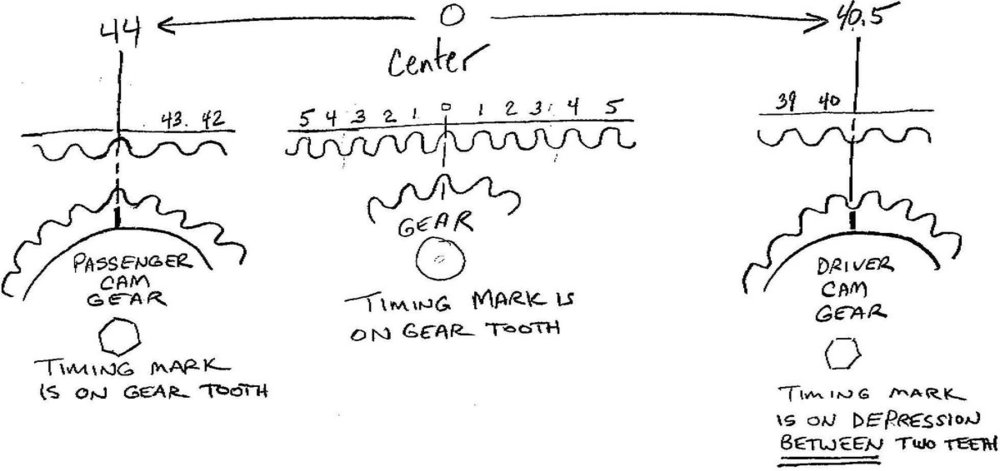
to be clear, he is talking about the cam markings - not the belt markings - the belt markings take a LOT more rotations to line up again. belt markings are there for convenience during installation only - so you don't have to count teeth.1 point
-
I just found this on another site btw:
 1 point
 -
1 pointDashboard at the far left (drivers USA ) right up by the windshield. Also stamped into the unibody in the engine bay on the firewall. Its a gen one so you can’t go wrong. 78 , 79 not a big deal. 78 will have black lower panels on the seats.1 point
-
1 pointI hope nobody minds if I start posting a lot in this thread now Wagon at Murphy Dome by Jason Ahrns, on Flickr Wagon at Murphy Dome by Jason Ahrns, on Flickr Wagon at Murphy Dome by Jason Ahrns, on Flickr1 point