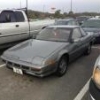
April 27, 20187 yr It's been a while since I posted anything. I recently did a complete reseal on my 1989 XT6, 2.7L H6. Look it up if you are doing the same, lots of good advice from members, with part numbers, pictures and some highly expected HLA issues. Everything is great, no clatter, no leaks, no smoke, no problems! All I need to do is recharge the updated R13 ac unit for the hot summer I'm predicting. I put a brand new set of 17" wheels from a 2012 Forester, 5x100, +48 ($400 for all 4, shipped) with Riken summer tires, 215 40s ($200 for all 4, shipped). Perfect fittment, highly recommended size combo. The ride is fine, no real difference from the original wheels and all seasons, probably because the front struts are original Subaru! The Forester wheels are heavier of course, so the car actually feels more stable and planted. Don't worry Subaru purists, the original salad cutter alloys are tucked away in the garage...
April 27, 20187 yr Author No air suspension, this one is FWD. There's only 162K miles on this car, the original struts are fine.

Please sign in to comment
You will be able to leave a comment after signing in
Sign In Now