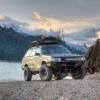
September 16, 200421 yr I didnt see the guy who owned this but it was outside the walmart in Mt. Vernon. I dont know if its anybodys on the board. but i just cant get over the fact that the taild light was wired on because his light switch was off and check out the 4X4 on the back, classic. i especially like the exhaust. just funny. First 4 Pics http://www.ultimatesubaru.org/photos/showgallery.php?si=&perpage=24&sort=1&cat=500&ppuser=4614&friendemail=email@yourfriend.com&password=
September 16, 200421 yr Well, it obviously runs, and somebody has alot of fun offroad with it by its looks. I know of a few of Soob owners that have cars that dont run.... Me included, but I'm 2 for 3
September 16, 200421 yr loooove the battle scars! it looks great. except for the hood, thats tacky. tyler j
September 16, 200421 yr but i just cant get over the fact that the taild light was wired on because his light switch was off Eh.. mine are wired to come on with the key.. switch borked and I was in the middle of a long trip.. temporary fixed that has worked well for over a year:)
September 16, 200421 yr I have that same year/color wagon sitting at my house. I wonder if he needs replacement fenders.
Please sign in to comment
You will be able to leave a comment after signing in
Sign In Now