July 17, 200619 yr That might be the "Mavrick Monster" I have been hearing about on the radio? Great shot!
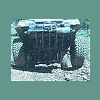
July 17, 200619 yr Author Do you have more Technical Info about it? Ya , I have all the specs. Its a 86 wagon with ea82 motor with a qjet. Fully ported heads 2" dual exhaust, Rear dif mounted in the front, Nissian transfere case behind the transaxle, 9" of lift. The motor and transaxle stayed in there stock location!!!The front diff is 6" foward and the rear diff is 2 1/2" back its running 33" pro comps 390 gears with home made lockers front and rear. I made custom lower control arms and torque bars with 1/2"x 2" steel with a 3/4" Grade 8 bolt for the pivot point and 1" stainless for the torque arm. It is fully protected under with rock bars diff to diff . And yes that is a 8000 Lbs winch with twin batterys. With 15 PSI in the tires it rides like a caddy in the woods. the jeeps and toys cant keep up without beating them selfs to pieces.
July 17, 200619 yr Awesome! Welcome to the board. We have a special off-road forum dedicated to people like us -Brian
July 18, 200619 yr Hey, a few of your pix arent comming up. Im getting a placecard from Photobucket saying theyve been moved or deleted. Sounds like a cool project anyways. -Brian
Please sign in to comment
You will be able to leave a comment after signing in
Sign In Now