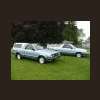
May 16, 201015 yr Here is a link to pictures of my new '86 Brat. If anyone is interested the Brat without the cap will most likely be for sale soon as the wife doesnt think I need so many toys (I disagree though). http://s934.photobucket.com/albums/a...at/New%20Brat/
May 17, 201015 yr Author Same here Maybe this will work. I am not the best with this stuff:banghead: http://s934.photobucket.com/albums/ad184/86brat/New%20Brat/ Edited May 17, 201015 yr by 86brat
May 17, 201015 yr Glad it went to a good home, your bid won by a dollar over me. I didn't even really want it, its just it sold way TOO cheap for what it is......that was the best BRAT for under 4grand for a long time. If i would have got it, I would have flipped it.....so very glad it went to someone who wanted it, you can has twins now. Very nice indeed.
May 18, 201015 yr What's the label say that is on the driver's side door panel? Looks good man. Just about spot on with my old one: Edited May 18, 201015 yr by Durania
May 18, 201015 yr What's the label say that is on the driver's side door panel? Looks good man. Just about spot on with my old one: it says this * when you leave your car during warm up, be sure to depress the accelerator pedal slightly to prevent the exhaust from overheating. If this is neglected the engine speed increase may cause overheating. * Do not turn off the engine while the car is moving.
May 23, 201015 yr Author The new link worked. DANG! clean brat. wish you were closer to me. Thanks, I wish i was closer to alot of you guys. Not many Subaru people here in the midwest.
May 23, 201015 yr Author Thanks for all the nice replys. I want to get a couple of the smaller exterior dents fixed and that is pretty much it. This will be my fun summer toy.

Please sign in to comment
You will be able to leave a comment after signing in
Sign In Now