Leaderboard
-

heartless
Members1Points4647Posts -
Turbone
Administrator1Points8515Posts -
3Pin
Members1Points753Posts -

Loyale 2.7 Turbo
Members1Points7843Posts




Popular Content
Showing content with the highest reputation on 10/11/20 in all areas
-
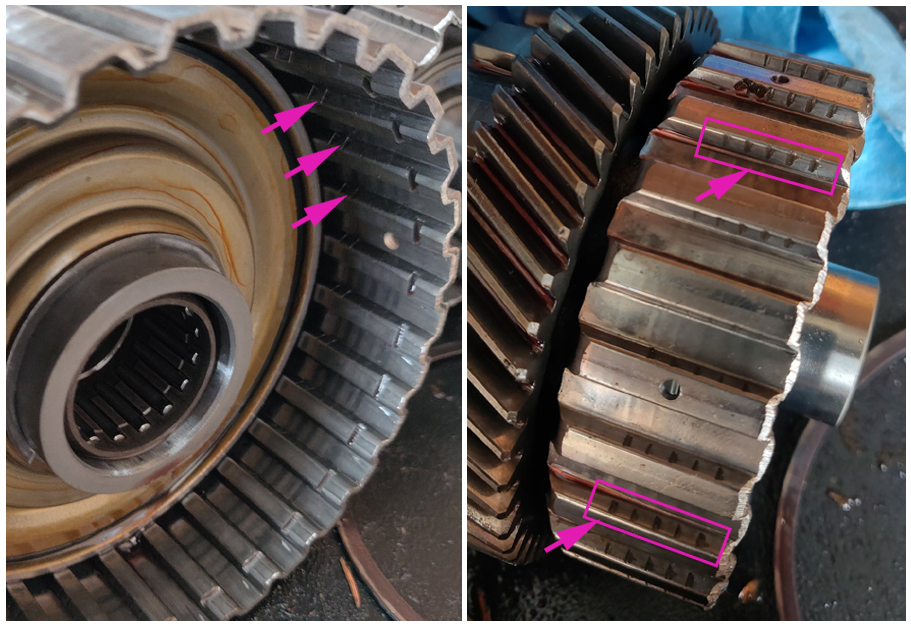
exploded Parts diagram on Opposed Forces site... part #20 is the "basket" - called complete shaft in the parts list.. and yes, it would appear that the piece you marked in red in the picture is the backside of that part... http://opposedforces.com/parts/legacy/us_b11/type_17/automatic_transmission/at_transfer_and_extension/illustration_3/ I have pointed out some of the grooves that need to be sanded out below.. on both the outer basket and the inner portion..( ALL grooves need to be removed.. not just the ones pointed at, btw) grooves will typically be worn in all the way around. If they are severe enough, it would warrant replacing the parts rather than attempting to "fix" them The clutch plates need to move freely inside the basket.. when the baskets get these grooves worn in them, the plates get stuck and do not move properly.
 1 point
 -
1 pointGood to see you are still lurking this forum Jes. Still got the blue ink in your pen1 point
-
1 pointAll my best to you and your family JesZeK. I am very sorry for your loss. Loosing a parent is one of the hardest things to go through. I lost my mother and several of my closest friends almost all at the same time not long ago. I pray for you that things will brighten up soon. -Jeff1 point
-
1 point
-
1 pointI have used Fel-pro a bunch of times. When the block and heads are prepped properly, I have never had a recurring HG issue.1 point
-
1 pointJesZek is alive and well, I just received a message from him last night. As you can see, this thread has been merged with the one asking about him. He said he plans on posting more in the future, but I have no idea what he has been up to.1 point