vwbajatruck@outlook.com
Members
-
Joined
-
Last visited
Everything posted by vwbajatruck@outlook.com
-
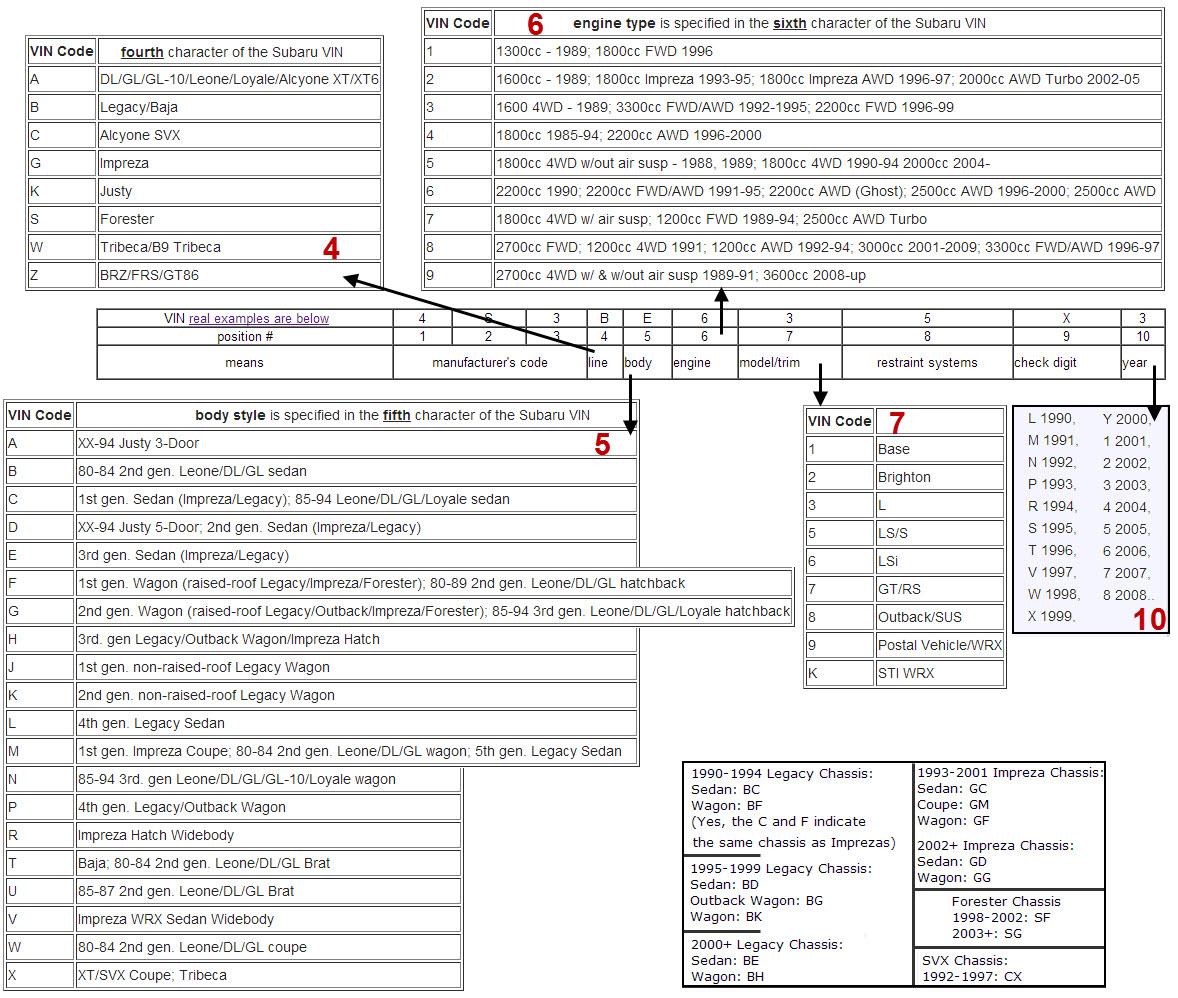
1. I cut and pasted the Vin Codes off a few free websites, then stuck a few arrows on it for a pocket guide if you can print it small enough; They should be correct for the years listed, but always double check. Let me know if they are not since some came from Wiki and Wiki is know for errors galore. 2. Just a Big Bore kit & Strokers basic guide for newbies like me to Subaru. Vin codes.pdf SUBARU EJ20ej22ej25 stroking guide.pdf
-
EJ22 Dizzy location at end of video and 4bbl comments:
-
-
EJ22 Dizzy location at end of video and 4bbl comments:
-
vwbajatruck@outlook.com replied to Scott in Bellingham's topic in Old Gen.: 80's GL/DL/XT/Loyales...EJ22 Dizzy location at end of video and 4bbl comments:
-
For the past 3 days Loyale 2.7 Turbo has email me with detailed answers to my questions, enthusiastic in his contacts and a great guy for sure even when tasked him with all my endless questions. It's not often you come across people like this and I appreciate all his help. Very much appreciated.
-
I had a long chat with Jerry today and quite like this guy. He patiently answering my questions, offered input, just a great all around chat about Subaru's and carb choices. Very knowledgeable person willing to help out another person when he could be doing better things. This board now has two great guys as far as i'm concerned and as forums go "that is far and few in between :)" Jerry I appreciate all your help this Sunday morning.
-
I hope this helps... After clicking the one of the manual download in this thread you will be taken to MediaFire eventually where there is a "BIG GREEN DOWNLOAD BUTTON" pointing you to click it for your document: If you do not want the MediaFire to give you the run-around and popups just "Right-Click" the big green "Download" button and select "Save-As" instead of clicking it for an endless loop. This procedure works as of 02/Oct/2015